
Contact-edit recovery with PixelKnock
Resolve a contact edit from its actual save state
When a contact edit loses its response, find out whether it saved before trying again. PixelKnock provides a check for the original edit and reloads current contacts when a teammate’s change causes a conflict.
Start with Free: 1,000 monthly credits and 1 seat.

Keep the contact edit attached to its home.
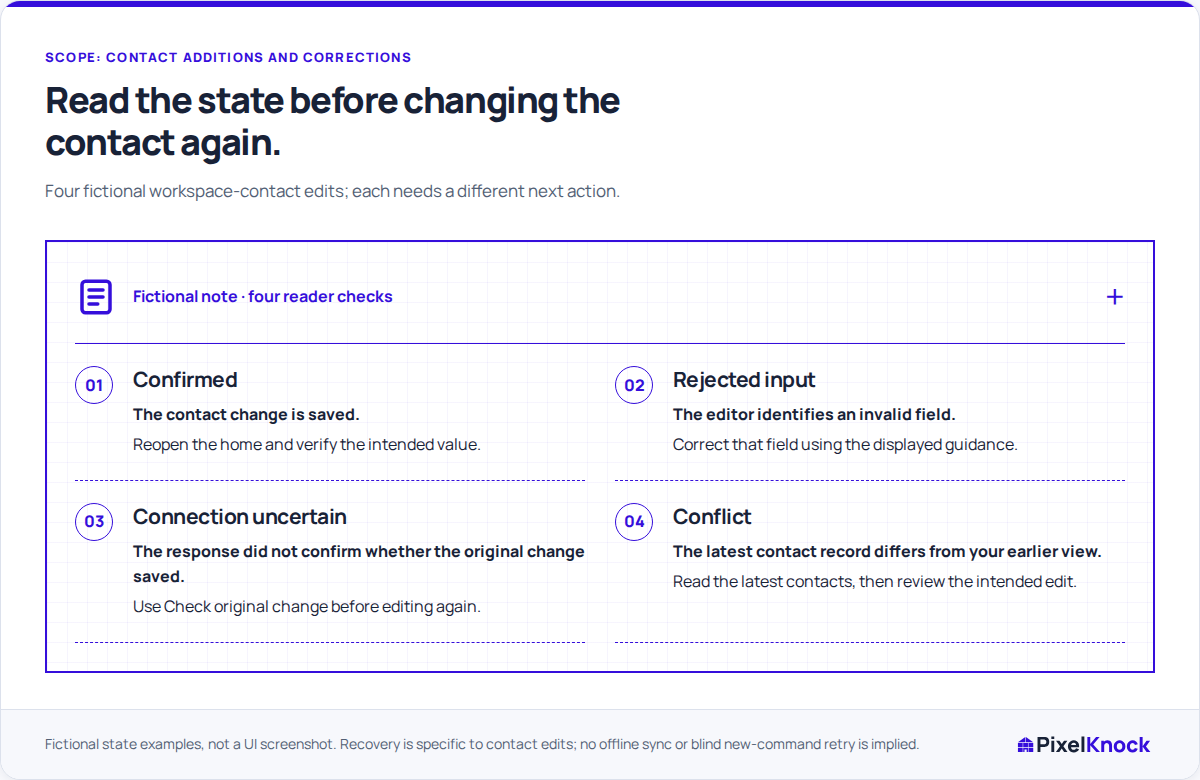
Confirm the workspace and saved home before adding a phone number or email, changing a supported status or removing a custom value. This gives you a specific record to verify if the response is interrupted.
Check an uncertain original change.
For an unconfirmed result, PixelKnock shows Check original change and locks further contact editing. The check can remain beside the contacts after you close the edit dialog. Use it before making another change.

Read newer details after a conflict.
If the contacts changed while you were editing, PixelKnock reloads their latest state. Your teammate may already have added the value you intended to save; compare the current record before retrying.
Verify the useful result.
Check the final value or status, then explain any useful source context in Activity. If the app instead identifies invalid input or an access restriction, address that message before submitting another edit.
Useful answers
Before your next session.
Does an unconfirmed response mean the edit failed?
The change may already have reached the server. Use Check original change when available, then read the resulting contact record.
What if I have already closed the contact editor?
Look for Check original change beside the contact details and use it if available. If you have left the home, reloaded or signed out, reopen the home and review current contacts before deciding what remains to change. This is not offline synchronization.
What if another teammate has changed the contact?
Read the latest details loaded after the conflict. If they differ from your intended correction, check the source with the teammate before making a new edit.
Put this workflow to work.
Review an unresolved contact edit and verify the resulting value at its home.
Start with Free: 1,000 monthly credits and 1 seat.